
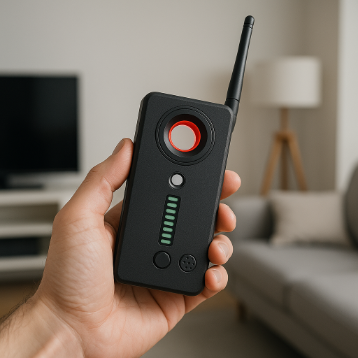
A hidden camera detector can be a useful tool, but it is not a magic wand. Many people buy one for peace of mind, wave it around a room for a few minutes, and assume the job is done. That is exactly where problems begin. Real privacy checks require patience, context, and an understanding of what these devices can and cannot do. If your goal is genuine advanced privacy protection, the biggest risk is not always the device itself. It is using it in a way that creates false confidence, causes unnecessary panic, or misses obvious warning signs.
| Mistake | What Goes Wrong | Better Approach |
|---|---|---|
| Relying on one method | You miss cameras that do not match your detector’s strengths | Combine visual inspection, lens finding, and signal scanning |
| Scanning too quickly | You overlook subtle reflections, signals, or unusual placement | Use a slow, repeatable room-by-room process |
| Ignoring hiding places and limitations | You focus on obvious spots and misunderstand what the detector can find | Check common concealment points and know detection limits |
| Misreading normal electronics | You mistake ordinary devices for surveillance equipment | Verify with multiple indicators before drawing conclusions |
| Failing to document and respond properly | You lose evidence or create confusion after a suspicious find | Record details, protect yourself, and escalate appropriately |
Mistake 1: Treating the Detector as the Whole of Advanced Privacy Protection
The most common error is assuming a detector does everything. In reality, different tools look for different signs. Some detectors are better at identifying radio frequency activity from transmitting devices. Others help you catch the reflective glint of a hidden lens. Neither approach guarantees a complete result on its own. A camera that stores footage locally rather than transmitting may not trigger an RF scan at all. A camera concealed behind dark material may be harder to spot visually unless you inspect the object closely.
For people building a broader routine around advanced privacy protection, the best mindset is to treat the detector as one part of a layered check. Start with your eyes. Look for objects that seem oddly placed, recently added, or pointed toward private areas such as beds, bathrooms, and changing spaces. Then use the detector to support that inspection rather than replace it.
A practical sweep usually includes three parts:
- Visual review: inspect clocks, smoke detectors, air fresheners, chargers, picture frames, TV boxes, and decorative objects.
- Lens check: use a lens-finding mode in low light and look for suspicious reflections from unlikely surfaces.
- Signal check: scan for active transmissions, especially around electronics that seem out of place.
When people skip that layered approach, they often leave the room thinking they are safe when they have only performed one narrow test.
Mistake 2: Scanning Too Quickly or in the Wrong Conditions
Speed ruins accuracy. A rushed sweep turns even a good detector into a weak one. Rooms should be checked slowly, with attention to angles, lighting, and distance. Lens detection features typically work better in dim conditions because reflections stand out more clearly. RF scans can become confusing in environments crowded with Wi-Fi routers, Bluetooth accessories, smart TVs, wireless speakers, and neighboring signals. If you do not control the environment as much as possible, the detector may seem unreliable when the real issue is the way it is being used.
A methodical routine is far more effective than waving the device around randomly. Move close to likely hiding places. Pause near suspicious objects. Recheck anything that produces a reading or unusual reflection. Good scanning is repetitive, not dramatic.
- Turn off or move nonessential wireless devices you control, if possible.
- Close curtains and reduce bright light before using lens detection features.
- Start at the entrance and move in a consistent path around the room.
- Check from different heights, especially eye level and above head level.
- Repeat the sweep once more before concluding the room is clear.
This slower process does not take much longer, but it sharply reduces the odds of missing something because you moved too fast or used the wrong mode in the wrong setting.
Mistake 3: Ignoring Common Hiding Places and the Limits of Detection
Many users focus on dramatic hiding spots and miss the ordinary ones. In reality, concealed cameras are often placed where they blend into common room features and have a clear view of private activity. That means everyday objects deserve more attention than unusual ones. If you only scan walls and corners, you may overlook the item sitting right on a shelf or plugged into a socket.
High-priority locations usually include:
- Smoke and motion detectors
- Alarm clocks and radio units
- Phone chargers, USB hubs, and adapters
- Picture frames and wall decor
- Air fresheners and small appliance housings
- Bookshelves, hooks, and tissue boxes
- Mirrors, vents, and devices facing beds or bathrooms
Just as important, understand the limits of the tool in your hand. A detector may not identify a device that is switched off, records only to internal storage, or is wired in a way that produces little obvious signal. A visual lens search may miss a camera if the lens is deeply recessed or covered by tinted material. That does not make the sweep useless. It simply means no detector should be treated as proof of absence.
The strongest habit is to combine suspicion with restraint. Notice what feels inconsistent with the space: a device aimed oddly, an object where it serves no obvious purpose, or a fixture with a tiny opening facing a private area. Those cues matter as much as the detector reading.
Mistake 4: Mistaking Harmless Electronics for Surveillance Devices
Privacy concerns can make normal electronics look sinister. That is understandable, but it can also lead to bad decisions. Wireless clutter is everywhere. A detector may react to a router, smart speaker, wireless keyboard receiver, baby monitor, or nearby device in another room. A reflective screw head, glossy sensor cover, or LED housing can resemble a hidden lens for a moment under the wrong light.
The answer is verification, not panic. If you get a reading, narrow the source. Move the detector closer and farther away. Check whether the signal weakens when you switch off nearby electronics you recognize. Look at the object carefully from multiple angles. Ask whether it has an obvious legitimate function in that location. A strong suspicion should be based on more than one clue, such as a suspicious position, unusual wiring, a lens-like opening, and a detector response that stays consistent.
It is also wise to avoid immediately dismantling fixtures or confronting people before you have a clear basis for concern. False accusations are serious, and hasty actions can destroy useful evidence or create unnecessary conflict. Careful observation is more valuable than a dramatic reaction.
Mistake 5: Forgetting That Advanced Privacy Protection Also Depends on What You Do Next
Finding something suspicious is only half the issue. The next steps determine whether you protect yourself effectively. Some people discover a possible device, unplug it at once, throw it away, or start posting accusations online. That may feel decisive, but it can make the situation harder to assess or report properly.
If you believe you have found a hidden camera, start by protecting your immediate privacy and safety. Move to a secure area if needed. Photograph the object in place, including the room context, wiring, and its line of sight. Note the time, location, and anything unusual about the setup. If you are in a hotel, rental property, workplace, or shared accommodation, report the issue through the appropriate management channel and contact local authorities when the circumstances warrant it. If the device appears dangerous or connected to tampering with electrical systems, do not handle it unnecessarily.
A simple response checklist helps:
- Document first: take clear photos and notes before disturbing the scene.
- Protect yourself: change rooms or cover private areas if you cannot leave immediately.
- Limit handling: avoid unnecessary tampering that could damage evidence.
- Escalate appropriately: notify property management, security personnel, or authorities based on the setting.
- Stay factual: report what you observed, not assumptions you cannot verify.
That final step matters. Good privacy practice is not only about detection. It is about disciplined response.
Used well, hidden camera detectors can support peace of mind and strengthen personal boundaries. Used poorly, they can create blind spots or false alarms. The smartest approach is calm, layered, and systematic: understand the tool, scan carefully, inspect the room with common sense, verify what you find, and document anything suspicious properly. That is what turns a gadget into a useful part of real advanced privacy protection.
Find out more at
DETEKCAM: Find Hidden Cameras
https://detekcam.com/
WOODLANDS CLOSE #08-63 MEGA@WOODLANDS SINGAPORE
Use DETEKCAM to find hidden cameras and spy devices anywhere hotels, Airbnbs, dressing rooms, and offices. Protect your privacy with the most advanced AI camera detector app.


